
Freelancers need strong outreach to find clients. However writing enough emails to clients takes time and energy. Therefore AI email apps help you work faster and smarter than humans.
Read More > Upwork vs Fiverr Which Platform Actually Makes You Rich
They improve tone or structure and clarity of the email. Most importantly they help you send more personalized messages without stress and without consuming time. In this article you will learn practical AI email hidden that boost response rates and protect your professional fame.
Read More> 10 AI Email Secrets to Double Your Freelance Outreach
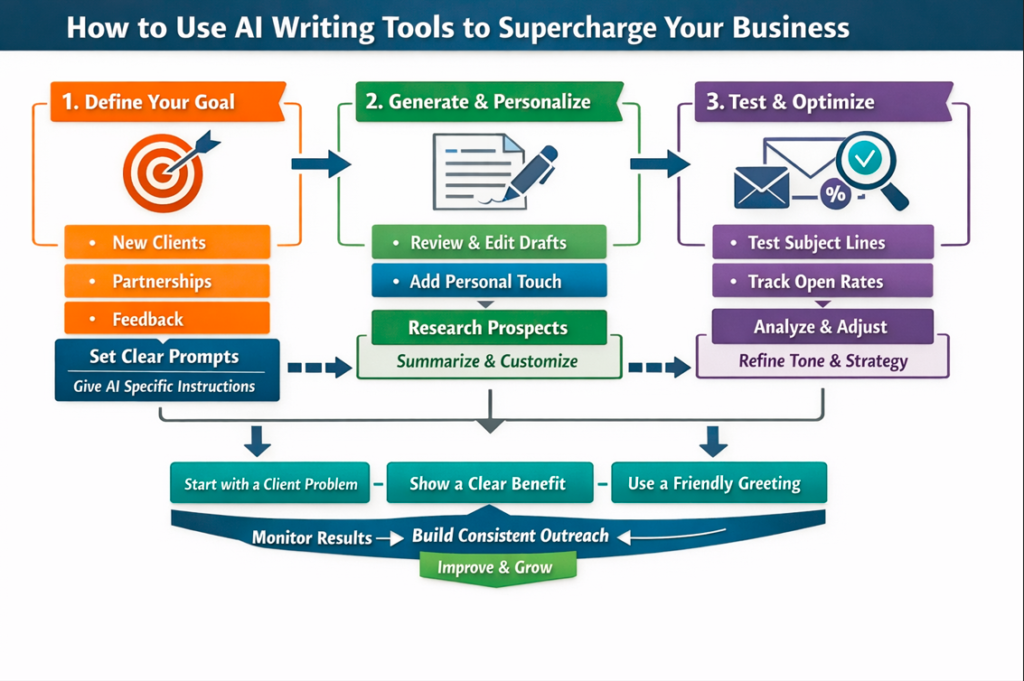
How to Use AI Writing Tools to Supercharge Your Business
1) Define your outreach goal. Decide whether you want new clients and partnerships or feedback.2) Give AI clear prompts. Such as ask it to write a short cold email for a web design client. 3) Review the generated draft carefully. Always add your personal experience and real success in freelancing platform.
Read more> how to earn money online for students free
Moreover use AI to research prospects quickly. You can summarize company websites or social profiles. Consequently you create personal emails that stand out. Also test different subject lines. AI apps can generate five or ten options within seconds.
Start with a clear client problem and their need. Start with a simple benefit statement (plan). Start with a friendly greeting that sounds human. These three steps build trust fast.
Finally track results. Measure open rates and reply rates. Then adjust prompts and tone based on performance. By the time you build a strong outreach points that works daily.
Read More> Start Earning Daily The Simple Online Platform That Works
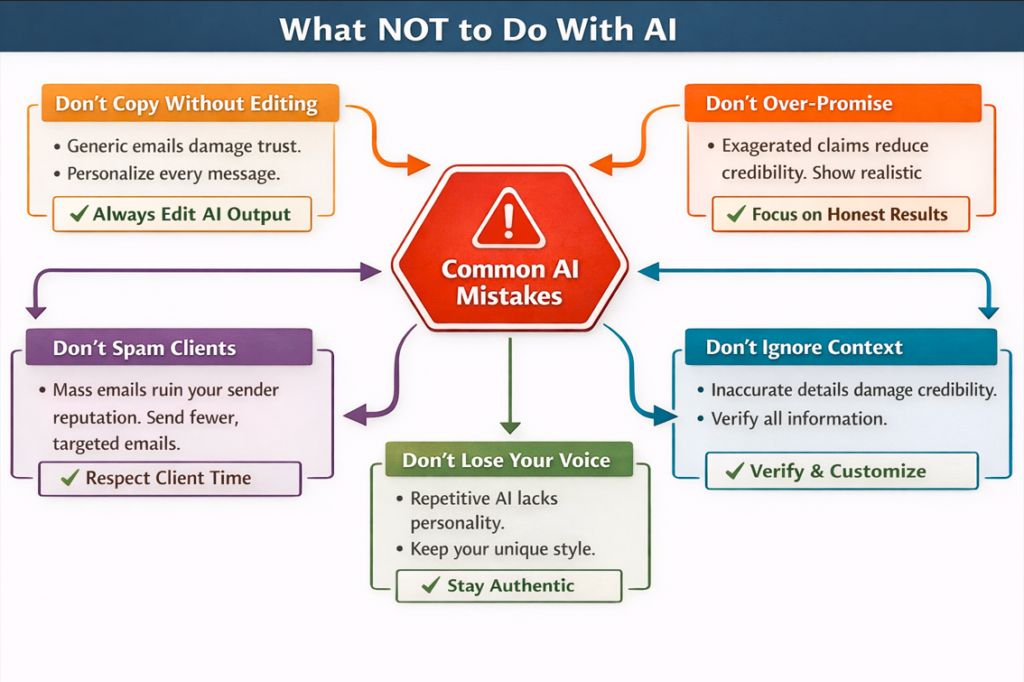
What NOT to Do With AI
Never copy AI output without manual editing. Common emails reduce trust and damage your brand. Instead personalize every message with real examples. Also avoid over promising results. Clients value honesty more than hype.
Read More> 100 Ways to Make Money With AI 2026
Do not send mass spam emails. Sending too many emails hurts your sender reputation. Consequently, fewer clients will see your messages. Additionally avoid complex language. Short and clear sentences improve readability.
Another mistake involves ignoring context. AI may produce incorrect details. Therefore verify names, companies and offers before sending. Lastly, never remove your authentic voice. AI should support your communication not replace your personality.
How to Choose the Right AI Writing Tool
First check ease of use. A simple interface helps you write faster. Next review customization features. Good tools allow tone control, templates and prompt editing. Moreover consider integration options. Tools that connect with email platforms save time.
Additionally evaluate pricing. Some freelancers prefer free tools, while others invest in premium features. Compare accuracy and speed or output quality. Check language support if you work globally.
Another important factor is data privacy. Choose tools that protect your information. Finally test trial versions. Real testing reveals whether the tool fits your workflow.
ChatGPT Email Writer Free
Many freelancers start with free AI apps. ChatGPT offers a powerful free option for drafting outreach emails. You can ask it to create subject lines, introductions or follow up messages. Moreover it helps refine tone. Such as you can request a friendly or professional style.
To use it effectively provide clear instructions it include your service, client type and desired outcome. Then review the draft and adjust wording. Add real project results or testimonials.
Free tools work well for beginners and remember to edit every output. Personalization always improves engagement and response rates.
Professionally AI Email Writer
Professional AI email writers focus on structure and persuasion. They include clear hooks and benefits or calls to action. Moreover they use proven copywriting frameworks like AIDA or PAS. These frameworks guide readers toward a response.
Start with a personalized opener. Then highlight a specific client problem. Next present your service as a solution. Finally include a simple call to action such as Can we schedule a quick call this week?
Professional AI tools also help maintain consistent tone. They ensure grammar accuracy and clarity. Consequently, your emails look polished and credible.
Professionally AI Email Writer
Advanced professional tools offer deeper analytics and automation. They can analyze engagement patterns. They can suggest better subject lines. They can even recommend optimal sending times. Therefore, you increase the chances of receiving replies.
Additionally, many tools provide collaboration features. Teams can share templates and track performance together. Freelancers who scale into agencies benefit greatly from these features. However, always maintain ethical outreach practices. Quality connections matter more than high volume.
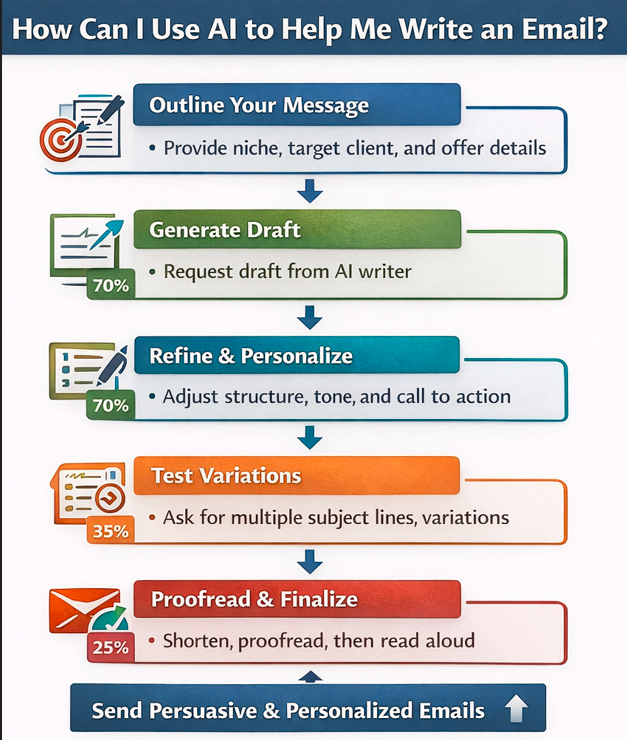
How Can I Use AI to Help Me Write an Email?
Begin by outlining your message. Provide AI with context such as your niche, target client, and offer. Then ask for a concise email draft. Afterward, refine the structure. Adjust tone, length, and call to action.
Next, request variations. AI can generate multiple subject lines or introductions. Consequently, you can test which version performs best. Also, use AI for proofreading. It quickly detects grammar errors and awkward phrasing.
Moreover, ask AI to shorten long paragraphs. Short emails increase readability and response rates. Finally, read the email aloud before sending. This step ensures the message sounds natural and confident.
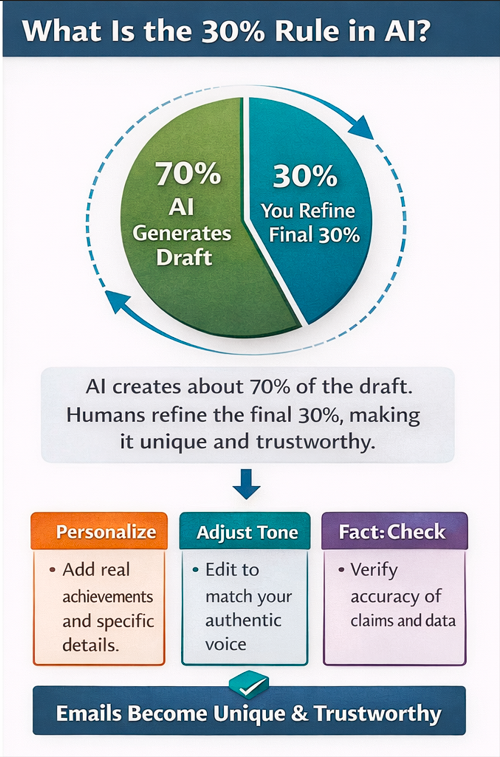
What Is the 30% Rule in AI?
The 30% rule suggests that AI creates about 70% of the draft. Meanwhile, humans refine the final 30%. This final portion includes personalization, emotional tone, and factual accuracy. Consequently, the email becomes unique and trustworthy.
For instance, AI may generate a general outreach email. However, you add personal achievements and client-specific details. You adjust phrases to match your voice. You verify every claim and statistic.
This balance ensures efficiency without losing authenticity. Therefore, freelancers maintain both productivity and credibility in their communication.
What Are 7 Types of AI?
Understanding AI types helps you choose the right tools for email writing and business growth.
- Reactive Machines – Basic systems that respond to specific inputs. They follow fixed rules.
- Limited Memory AI – Systems that learn from past data. Most modern email tools fall into this category.
- Theory of Mind AI – Experimental systems that aim to understand emotions and intentions.
- Self-Aware AI – Hypothetical advanced systems with independent awareness.
- Narrow AI – Specialized tools that perform single tasks like writing or analyzing emails.
- General AI – Conceptual systems capable of human-like reasoning across many tasks.
- Super AI – A theoretical future form exceeding human intelligence.
Freelancers mostly use Narrow AI and Limited Memory AI tools today. These systems improve productivity without requiring deep technical skills.
Final Thoughts
AI email writing tools transform freelance outreach. They save time, enhance personalization, and improve clarity. However, success depends on smart usage. Always combine automation with human creativity. Always focus on genuine communication. Always refine drafts before sending.
When used strategically, AI becomes your writing assistant, research helper, and productivity booster. Consequently, you reach more clients and build stronger relationships. Start small, test different strategies, and refine your process continuously. Over time, your outreach system will become faster, smarter, and far more effective.