
You do not need a film degree. You do not need a studio. And you definitely do not need expensive gear to start earning online. What you do need are the right video editing skills a structured video editing workflow and clarity on how to turn basic editing knowledge into income.
Right now, video dominates platforms like YouTube, Instagram, TikTok and Facebook. Businesses, creators, coaches and brands are actively searching for editors who can help them grow.
This article will show you:
- The video editing basics that actually matter
- A professional step-by-step video editing guide
- The best video editing software free and paid
- Mistakes beginners make
- How to move from learning to earning
- A practical roadmap to build real income
If you want to edit faster or smarter and more profitably this is your blueprint.
Read More > Upwork vs Fiverr Which Platform Actually Makes You Rich
What Are Video Editing Skills?
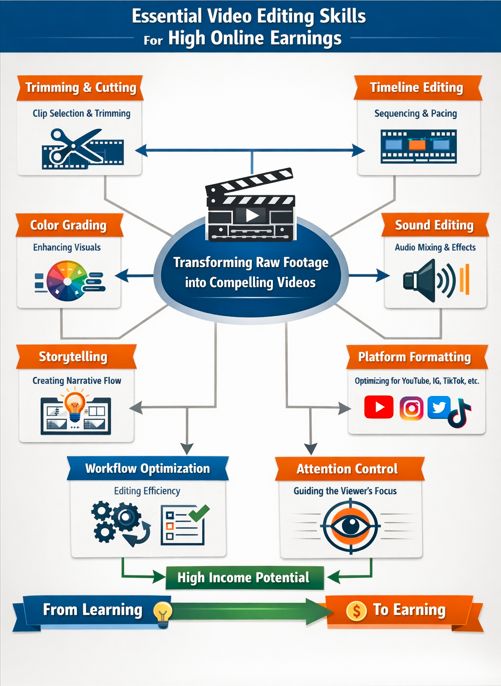
Video editing skills are the technical and creative abilities used to transform raw footage into a compelling final product.
This includes:
- Trimming and cutting techniques
- Timeline editing techniques
- Color grading fundamentals
- Sound editing and audio mixing
- Storytelling through video editing
- Footage sequencing tips
- Workflow optimization
- Platform specific formatting
Think of raw footage like raw ingredients. Editing is the cooking process. Without structure, seasoning, and timing it’s just unprepared material. At its core video editing is about attention control. You decide what the viewer sees, hears, and feels second by second (video editing).
Read More> 10 AI Email Secrets to Double Your Freelance Outreach
Why Video Editing Is a High-Income Skill (And Why Now)
The global shift to video first content changed everything.
Brands no longer ask
Should we use video?
They ask:
Who can edit our videos consistently and professionally?
Here’s why video editing for content creators is exploding:
- Short form video is dominating algorithms.
- YouTube monetization requires strong editing retention.
- Online courses and digital products rely on polished production.
- AI tools are increasing demand not replacing skilled editors.
High-demand + scalable skill + remote flexibility = strong earning potential of video editing
Read more> how to earn money online for students free
The Top 7 Benefits of Mastering Video Editing Skills
1. Multiple Income Streams
You can earn through
- Freelancing
- YouTube editing contracts
- Agency work
- Course editing
- Social media management
- Content repurposing
Many editors begin with simple YouTube video editor tasks and expand into high ticket projects.
Read More > 10 Best Free AI Trading Bots in 2026 for Beginners
2. Location Independence
You only need
- A laptop
- Internet connection
- Editing software
That’s it.
3. Strong Market Demand
Creators struggle with editing consistency. Business owners do not have time. Agencies need specialists.
Editing workflow efficiency becomes your competitive edge.
Read More> Start Earning Daily The Simple Online Platform That Works
4. Scalable Rates
Beginner editors may start small. But as your
- Professional editing tricks improve
- Cinematic editing tips get sharper
- Speed increases
You can raise rates confidently.
5. Creative Satisfaction
Editing combines logic and art.
You manage pacing, transitions, music, emotion almost like conducting an orchestra.
6. Fast Skill Acquisition
Compared to coding or complex design, video editing fundamentals can be learned quickly with practical editing exercises.
The learning curve for editors is manageable if structured properly.
7. AI as an Accelerator (video editing)
Tools like AI video editors help with:
- Auto captioning
- Rough cuts
- Background removal
- Smart color correction
But storytelling through video editing still requires human judgment.
The Complete Step-by-Step Video Editing Process
This section targets: “How to edit videos like a pro?”
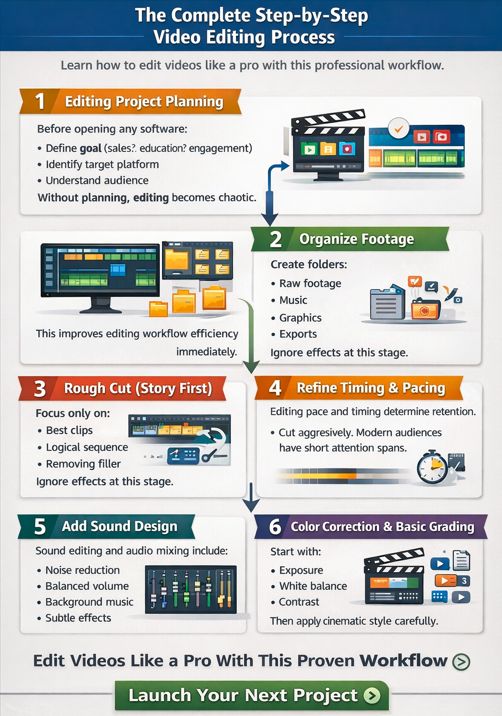
Step 1: Editing Project Planning
Before opening any software:
- Define goal sales? education? engagement?
- Identify target platform
- Understand audience
- Outline key message
Without planning video editing becomes chaotic.
Step 2: Organize Footage
Create folders:
- Raw footage
- Music
- Graphics
- Exports
This improves editing workflow efficiency immediately.
Step 3: Rough Cut
Focus only on:
- Best clips
- Logical sequence
- Removing filler
Ignore effects at this stage.
Step 4: Refine Timing and Pacing
Editing pace and timing determine retention.
Cut aggressively. Modern audiences have short attention spans.
Step 5: Add Sound Design
Sound editing and audio mixing include:
- Noise reduction
- Balanced volume
- Background music
- Subtle effects
Bad audio kills great visuals.
Step 6: Color Correction & Basic Grading
Start with:
- Exposure
- White balance
- Contrast
Then apply cinematic style carefully.
Step 7: Export Settings Explained
Always match:
- Platform resolution
- Aspect ratio
- Bitrate
Export mistakes are common beginner editing challenges.
Best Video Editing Software (Free and Paid)
Here are some reliable tools:
Free Video Editor Options
- (DaVinci Resolve) Professional-level and free
- (CapCut) Great for social content
- Canva (Canva Video Editor) Beginner friendly
- (Splice) Mobile-based editing
Professional Video Editing Software
- Adobe Premiere Pro
- Final Cut Pro
Online Video Editor Tools
- Clipchamp
- VEED
Tip: Choose one software and master it deeply. Switching constantly slows growth.
Common Video Editing Mistakes Beginners Make
Strong editors grow faster because they avoid these:
❌ Overusing Transitions
Simple cuts outperform flashy effects.
❌ Ignoring Audio Quality
Poor audio makes videos feel unprofessional.
❌ No Clear Story
Random clips without structure reduce retention.
❌ Editing Without a Workflow
A defined editing workflow checklist saves hours.
❌ Perfection Paralysis
Shipping consistently builds skill faster than endless tweaking.
A Practical Guide: How to Build High Online Earnings with Editing
Phase 1: Build Foundations (Weeks 1–4)
- Learn video editing basics
- Practice trimming and cutting techniques
- Edit sample projects
- Follow beginner friendly editing advice
Daily 60–90 minutes is enough.
Phase 2: Create a Portfolio (Weeks 4–8)
- Edit 5–10 demo projects
- Re-edit existing YouTube videos
- Create before/after samples
- Showcase storytelling through video editing
Phase 3: Start Freelancing
Look for clients on:
- Upwork
- Fiverr
Pitch clearly. Show value, not just skill.
Phase 4: Increase Rates Through Specialization
Choose a niche:
- YouTube video editor
- Podcast editor
- Short-form content editor
- Course editor
Specialists earn more.
FAQ Section
How long does it take to learn video editing?
Most beginners can understand video editing fundamentals in 4–8 weeks with daily practice. Mastery depends on consistency, project complexity, and specialization.
What is the best free video editing software?
DaVinci Resolve is widely considered the most powerful free video editor offering professional-level tools for color grading, audio mixing, and timeline editing.
Can I earn money with basic editing skills?
Yes. Many clients only require:
- Clean cuts
- Subtitle formatting
- Basic color correction
- Simple transitions
Advanced cinematic editing tips are not required to start earning.
Read More> data entry job how to get work from home 2026
Do I need video editing classes?
Formal video editing classes can help, but practical editing exercises and real projects accelerate learning faster than theory alone.
Read More> How to Make $10K on YouTube Using Only AI 2026
Beginner vs Advanced Editing: What Changes?
| Beginner | Advanced |
|---|---|
| Focus on cuts | Focus on emotion |
| Basic timing | Intentional pacing |
| Presets | Custom grading |
| Slow workflow | Editing shortcuts and methods |
The difference is not software it’s decision making.
Read More> 100 Ways to Make Money With AI 2026
Essential Editing Skills That Increase Income Fast
Focus on these first:
- Editing workflow efficiency
- Shortcuts for efficient editing
- Strong sound editing
- Hook optimization (first 5 seconds)
- Retention focused cuts
These directly impact client results.
Read More> Best Passive Income Ideas to earn money in 2026
Internal Linking Opportunities
You can naturally link to
- A guide on How to Start Freelancing as a Beginner
- A detailed review of Best Free Online Tools for Content Creators
- A blog post on How to Grow a YouTube Channel Fast
Conclusion
Video editing is not just a creative hobby. It’s a leverage skill.
You can:
- Work remotely
- Scale income
- Build authority
- Create your own content brand
Start with video editing basics. Develop a repeatable video editing workflow. Practice consistently. Ship projects. Improve with feedback. Your first edits may feel average. That’s normal. But every project builds confidence. Every timeline builds skill. Every client builds income. The opportunity is real and growing. Now open your editor and start cutting.